This is a short test post for WordPress. It contains a heading, a paragraph, and a simple list to check formatting.
Quick Tips
- Always save your work.
- Check your links.
- Preview before publishing.
End of test post.
This is a short test post for WordPress. It contains a heading, a paragraph, and a simple list to check formatting.
End of test post.
家里的路由器很多年没有动了,用得好好的,也没有理由去动。今天忽然想ssh上去看看什么情况,然后就这样了:
root@bwh81:~# ssh root@xxx.tpu01yzx.me -p 999 Unable to negotiate with 121.xx.xx.219 port 999: no matching host key type found. Their offer: ssh-rsa
经过调查后发现,原来是主机的公钥使用SSH-RSA方案,而这个方案里采用了不安全的SHA1算法,因此被主流的SSH客户端所抛弃,默认不接受这种方案的公钥。然后老旧的路由器实在不想乱动,程序员都懂的,能跑的程序就不要乱动了。这样的话,只能从客户端这边下手,明确告诉客户端接受这种公钥。于是现在连接的命令应该是这样的:
ssh -o HostKeyAlgorithms=+ssh-rsa -o PubkeyAcceptedAlgorithms=+ssh-rsa root@xxx.tpu01yzx.me -p 999
至此,问题完美解决。当然了,如何还想继续折腾搞什么配置文件的,除了消耗时间看文档实在没什么益处,就此鸣金收兵。
最近很火的Claude Code由于某些原因在国内无法使用,虽然有魔法,国内也有一些镜像,但开通包月是不太划算的,原因主要有两个:1)包月有调用次数限制,对于重度使用用户来说需要花更多的钱开通昂贵的套餐;2)有时间限制,只要开通了包月,及时不用,费用也会扣。基于以上两个原因,希望找到一个类似云计算那种的按需付费的用法。
经过前面的背景介绍,相信有不少人跟我有相同的想法,特别是猎奇的程序猿们。在一次偶然的机会,我发现原来可以通过环境变量来设置直接使用API服务,而不需要账号(需要开通包月套餐)。用法也是相当简单的。
# 进入项目目录
cd your-project-folder
# Linux/Unix设置环境变量
export ANTHROPIC_AUTH_TOKEN=sk-xxx # 替换为您的实际令牌
export ANTHROPIC_BASE_URL=https://api.96open.com
export API_TIMEOUT_MS=300000 # 设置为 300 秒超时
# 启动 Claude Code
claude
喜欢一行命令的可以这么写
(cd your-project-folder; ANTHROPIC_AUTH_TOKEN=sk-xxx ANTHROPIC_BASE_URL=https://api.96open.com claude )
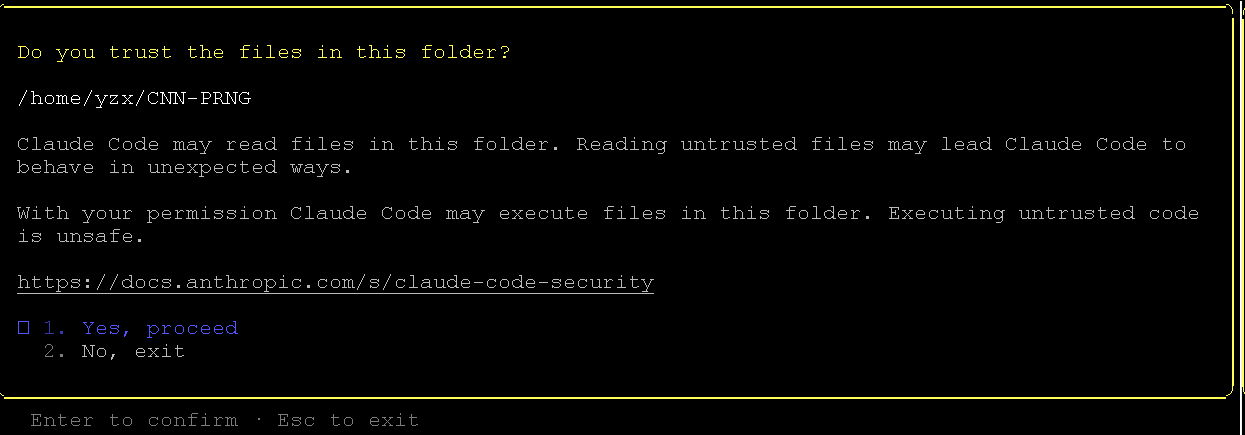
第一次启动的时候会有个提示:

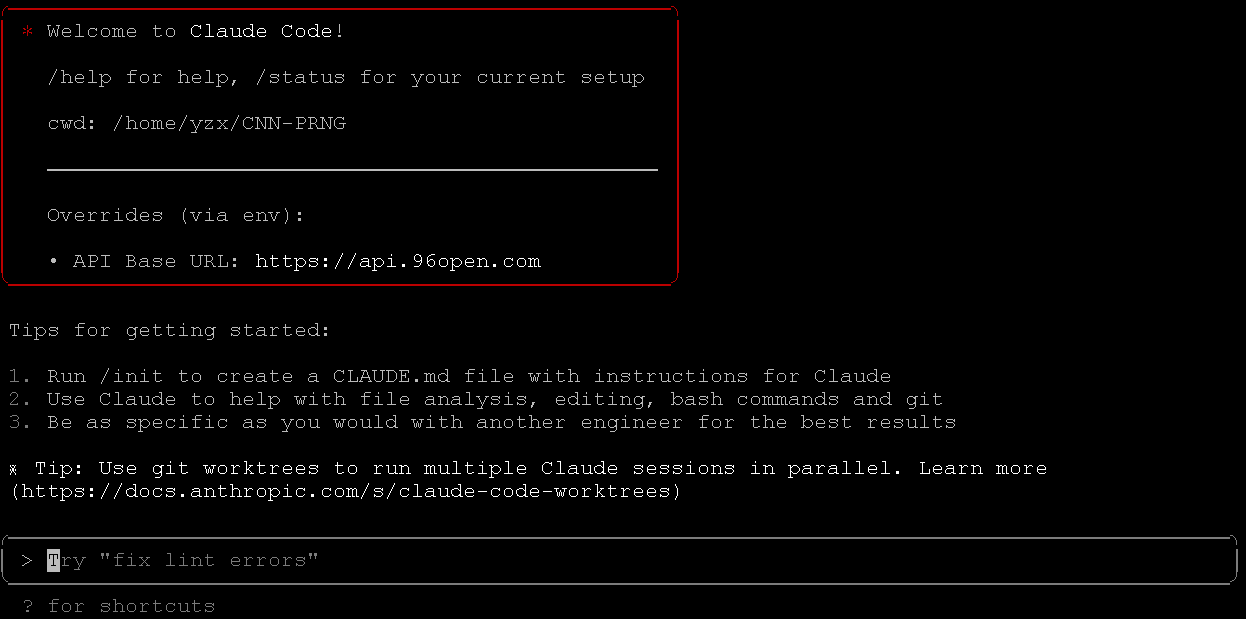
只能选YES,然后就进入到Claude Code的对话界面了。

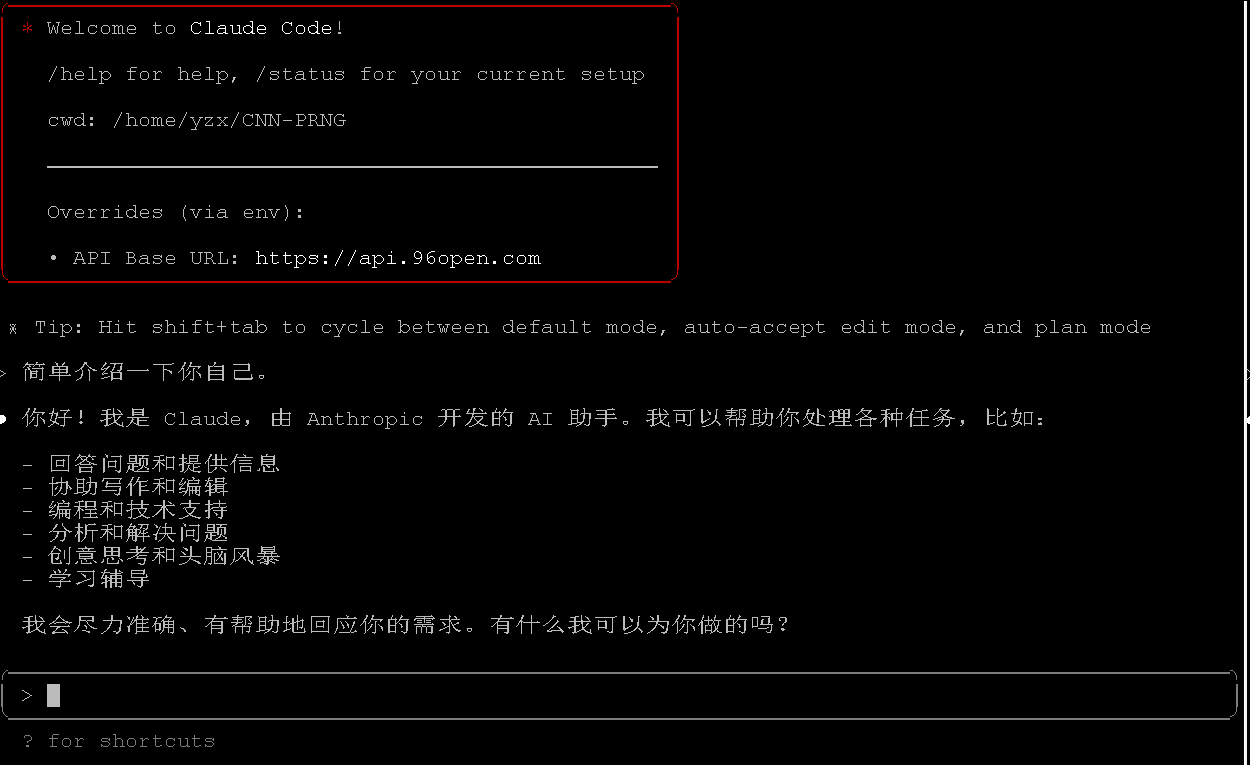
简单互动一下还是可以的:

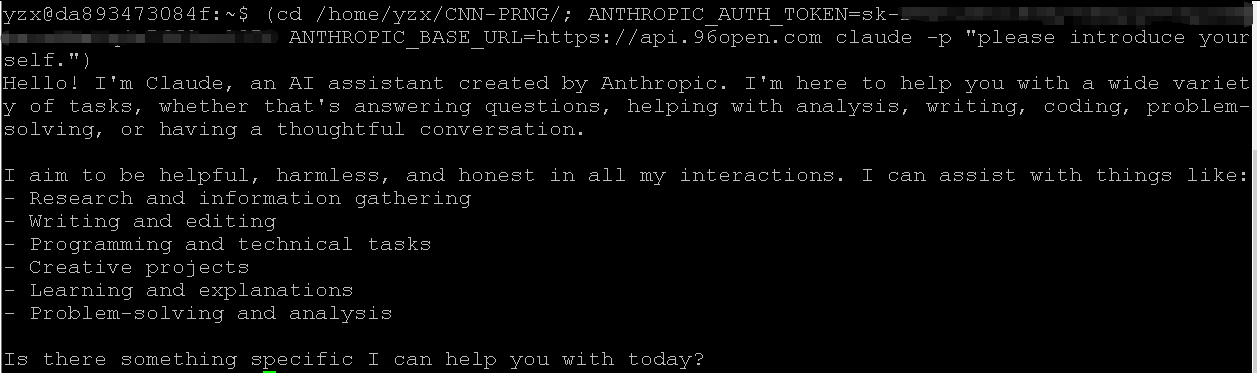
当然了,也可以直接在命令行处理,记得带个-p参数就可以了。

重度使用了几天,感觉良好,就是有点心疼这个费用。大概估算了一下费用,同时开3个窗口,重度使用1天,费用差不多要 50 RMB。所以当务之急是找到一个便宜的API服务,我这个是在某宝上搜索找到的,价格还算可以,这里就不打广告了,也欢迎万能的网友们留言告诉我哪里还有更优质的服务。
由于不希望学生可以复制粘贴代码,这样会失去实测的目的,但偶尔自己也需要复制粘贴测试学生提供的代码,于是用篡改猴组件给前端页面注入JS脚本来实现这个功能。由于代码编辑器是高级的monaco[1],所以需要使用monaco的API来设置代码,以保持数据的一致性,用法也是常规的editor->model->get/setValue。唯一需要知道的是如何引用已经存在的editor,凭借经验,大多数会放在window对象下,于是盲猜是window.monaco或者window.editor。最终确定是window.monaco.editor。注意:在篡改猴的JS脚本中,需要使用unsafeWindow来访问正常的window对象。
// ==UserScript==
// @name 清览题库|清览测验复制粘贴
// @namespace https://app.qingline.net/student/examing*
// @version 0.2
// @description 自动屏蔽弹窗;允许复制题目;允许复制代码;允许粘贴代码
// @author tpu01yzx
// @connect *
// @match https://app.qingline.net/student/examing*
// @match https://app.qingline.net/student/training?exam_id=*
// @run-at document-end
// @license MIT
// @grant unsafeWindow
// ==/UserScript==
(function () {
console.log('清览题库|清览测验复制粘贴 => start');
'use strict';
window.addEventListener('load', function () {
setTimeout(() => {
init();
}, 1000);
});
function getQuesText() {
const $ = (s) => [...document.querySelectorAll(s)];
const head = $(".stem")[0]
.textContent
.trim()
.replace(/^([0-9]+)/, "")
.replace(/[。?]/, "")
.replace(/(\s+?)/g, " ");
const body = $(".info_content")[0].textContent.trim();
const test = $(".test_case_content")[0].textContent.trim();
return head + "\n" + body + "\n" + test;
}
function getCodeText() {
return "//Copied from app.qingline.net \n" + document.getElementsByClassName("inputarea")[0].value;
}
function AddButton(p, t, func, tips, cn) {
// 创建一个新的按钮元素
const newButton = document.createElement('button');
newButton.type = 'button';
//newButton.style.marginRight = "10px";
newButton.className = 'submit_btn ant-btn '+ cn;
// 创建一个新的span元素并将其添加到按钮中
const newSpan = document.createElement('span');
newSpan.textContent = t;
newButton.appendChild(newSpan);
// 添加新按钮作为fixed_con元素的第一个子元素
p.insertBefore(newButton, p.firstChild);
//fixedCon.appendChild(newButton);
newButton.addEventListener('click', function () {
//const textToCopy = getQuesText();
//console.log(textToCopy);
//navigator.clipboard.writeText(textToCopy)
var msg;
try{
func();
msg = tips || "成功";
}catch(e){
msg = tips + "失败";
}
//console.log('Text copied to clipboard');
// 创建一个新的元素来显示复制成功的消息
const copySuccessMessage = document.createElement('div');
copySuccessMessage.textContent = msg;
copySuccessMessage.style.position = 'fixed';
copySuccessMessage.style.bottom = '10px';
copySuccessMessage.style.right = '10px';
copySuccessMessage.style.padding = '10px';
copySuccessMessage.style.backgroundColor = '#3d64ff';
copySuccessMessage.style.color = 'white';
copySuccessMessage.style.borderRadius = '5px';
document.body.appendChild(copySuccessMessage);
// 一段时间后隐藏消息
setTimeout(function () {
copySuccessMessage.style.display = 'none';
}, 1000);
});
}
function init() {
const cn = 'MyFunctionButton';
//console.log('清览题库|清览测验禁用复制和全屏 => init');
// 选择fixed_con元素
var fixedCon = document.getElementsByClassName("right_bottom_btns");
if(fixedCon && fixedCon.length > 0) {
fixedCon = fixedCon[0];
//console.log("found fixCon.");
var myButton = document.getElementsByClassName(cn);
if(myButton == null || myButton.length <= 0){
console.log("found no myButton.");
AddButton(fixedCon, '复制题目', function() {
const textToCopy = getQuesText();
//console.log(textToCopy);
navigator.clipboard.writeText(textToCopy);
}, '复制成功~', cn);
AddButton(fixedCon, '投影模式', function() {
const applyProjectionStyleToElements = (es) => {
// 定义递归函数
const applyStyle = (el) => {
if (el.style) {
el.style.backgroundColor = "#002b36"; // 深蓝色背景
el.style.color = "#FFFFFF"; // 白色字体
el.style.fontSize = "24px"; // 字体大小
el.style.fontWeight = "bold"; // 加粗
}
// 遍历子元素并递归调用
Array.from(el.children).forEach(child => applyStyle(child));
};
// 对传入的主元素应用样式
if(es && es.length > 0) {
var i;
for(i = 0; i < es.length; i++) {
var element = es[i];
//console.log(element);
applyStyle(element);
}
}
};
const elements = [
document.querySelector('.ques_all'),
//document.querySelector('.info_content'),
];
//console.log(elements);
applyProjectionStyleToElements(elements);
const _window = unsafeWindow ? unsafeWindow : window;
const editor = _window.monaco.editor;
// 定义投影模式主题
editor.defineTheme('projectionTheme', {
base: 'vs-dark', // 基于暗色主题
inherit: true, // 继承默认规则
rules: [
{ token: '', foreground: 'FFFFFF', background: '002b36' }, // 默认颜色
{ token: 'keyword', foreground: 'FFD700' }, // 关键字 - 金黄色
{ token: 'number', foreground: '87CEFA' }, // 数字 - 浅蓝色
{ token: 'string', foreground: '90EE90' }, // 字符串 - 浅绿色
{ token: 'comment', foreground: 'B0C4DE' }, // 注释 - 浅灰蓝
],
colors: {
'editor.background': '#002b36', // 编辑器背景色
'editor.foreground': '#FFFFFF', // 编辑器前景色
}
});
// 应用主题
editor.setTheme('projectionTheme');
//const lines = document.querySelector(".monaco-editor");
//const fontSize = 32; // 字体大小
//const lineHeight = Math.ceil(fontSize * 1.5); // 动态计算行高
//lines.style.fontSize = `${fontSize}px`;
//lines.style.lineHeight = `${lineHeight}px`;
//const editorDomElement = editor.getDomNode();
//editorDomElement.style.fontSize = fontSize + 'px';
//editorDomElement.style.lineHeight = lineHeight;
// 通知编辑器布局需要更新
editor.layout();
}, '启用投影模式', cn);
AddButton(fixedCon, '切换题目', function() {
// 获取左右元素
const leftElement = document.querySelector('.training_wrap_left');
const rightElement = document.querySelector('.training_wrap_right');
// 静态变量,用于记录初始状态
if (!leftElement.dataset.originalWidth) {
leftElement.dataset.originalWidth = getComputedStyle(leftElement).width;
rightElement.dataset.originalWidth = getComputedStyle(rightElement).width;
}
// 切换状态
if (leftElement.style.width === '0px' || leftElement.style.display === 'none') {
// 恢复到原始状态
leftElement.style.width = leftElement.dataset.originalWidth;
leftElement.style.display = 'block';
rightElement.style.width = rightElement.dataset.originalWidth;
} else {
// 隐藏左侧,右侧扩展到全宽
leftElement.style.width = '0';
leftElement.style.display = 'none';
rightElement.style.width = '100%';
}
}, '切换成功~', cn);
AddButton(fixedCon, '复制代码', function() {
//const textToCopy = getCodeText();
const _window = unsafeWindow ? unsafeWindow : window;
const models = _window.monaco.editor.getModels();
const spmodel = models[models.length - 1];
const textToCopy = spmodel.getValue();
console.log(textToCopy);
navigator.clipboard.writeText(textToCopy);
}, '复制成功~', cn);
AddButton(fixedCon, '粘贴代码', async function() {
const _window = unsafeWindow ? unsafeWindow : window;
const models = _window.monaco.editor.getModels();
const spmodel = models[models.length - 1];
const textToPaste = await navigator.clipboard.readText();
console.log("textToPaste:" + textToPaste);
spmodel.setValue(textToPaste);
//document.getElementsByClassName("inputarea")[0].value = textToPaste;
}, '粘贴成功~', cn);
} else {
//console.log("found my button.");
}
} else {
console.log("no fixCon found.");
}
// 检查是否存在弹窗
const modal = document.querySelector('.ant-modal-body');
if (modal) {
const modalRoot = document.querySelector('.ant-modal-root');
if(modalRoot) {
const modalTitle = modalRoot.querySelector(".ant-modal-confirm-title");
if(modalTitle) {
console.log('modalTitle.textContent:' + modalTitle.textContent);
if(modalTitle.textContent == '为了给您最好的使用体验,请您使用谷歌浏览器。') {
modalRoot.remove();
}
}
}
}
setTimeout(function() {
init();
}, 3000);
}
})();
参考文献:
[1] https://microsoft.github.io/monaco-editor/
[2] https://microsoft.github.io/monaco-editor/docs.html#interfaces/editor.ITextModel.html
一、问题描述
我们的r730xd是在内网的,然后在网关那里做了端口映射到r730xd的idrac,正常来说就可以访问内网的idrac。但实际情况是页面会提示400错误。
二、进一步挖掘
经过搜索,大致了解到是为了安全[4],如果不对HTTP请求的HOST头部做限制的话,容易受到攻击。这个问题在[1][2][3]中都有提及,解决方法自然也是有的,在下一节。
三、解决方法
我们引用[3]中的官方回复,给出两种方法。
方法一:
#Disable host header check
racadm set idrac.webserver.HostHeaderCheck 0
方法二:(推荐)
# Add manual entry to allow list
racadm set idrac.webserver.ManualDNSEntry 192.168.20.30
racadm set idrac.webserver.ManualDNSentry 192.168.20.30,idrac.mydomain.com
这两种方法都需要通过ssh登陆到idrac的终端执行,其中192.168.20.30是内网的IP,idrac.mydomain.com 是外网的域名。
参考资料
[1] https://www.dell.com/community/PowerEdge%E6%9C%8D%E5%8A%A1%E5%99%A8/r730xd%E5%85%AC%E7%BD%91IP%E8%AE%BF%E9%97%AEidrac-web%E6%8A%A5400%E8%AE%BF%E9%97%AE%E9%94%99%E8%AF%AF/td-p/8334529
[2] https://www.cnblogs.com/XingXiaoMeng/p/17060182.html
[3] https://www.dell.com/support/kbdoc/zh-cn/000189996/idrac8-https-fqdn-connection-failures-on-2-81-81-81?lang=en
[4] https://www.dell.com/support/kbdoc/zh-cn/000183758/dsa-2021-041-dell-emc-idrac-8-security-update-for-a-host-header-injection-vulnerability
为了增加工作效率,特地从某宝上淘了一台洋垃圾,戴尔R730xd,内存和CPU都是加大了配置,显卡则一般,硬盘留空自己填坑。具体配置如下:
E5-2696V42/DDR4 768G内存/SAS 300G1/H730P 阵列卡/1050TI 4G*1/满盘架/双电750W
硬盘是自己单独买的三个硬盘:
1. WD 6T蓝盘 WD60EZAZ 只有 OEM 680
2. WD 2T 金盘 WD2005VBYZ 908
3. WD 2T SSD固态绿盘2.5寸 SATA 865
本来一切都还算顺利,开机之后,那个杀猪一样的噪声把我震惊了。只要想办法调整风扇的转速,正常来说机器温度不高的时候,风扇不应该转这么快。于是首先想到的是这样调整,其中0x0A表示风扇最大转速的百分比[1]:
ipmitool raw 0x30 0x30 0x01 0x00
ipmitool raw 0x30 0x30 0x02 0xff 0x0A
但是后来发现原来根本原因是由于加装了PCIE显卡的原因,导致主板自作聪明高估了热量,因此要求风扇高速运转。最好禁用掉这个自作聪明的功能[2]:
ipmitool raw 0x30 0xce 0x00 0x16 0x05 0x00 0x00 0x00 0x05 0x00 0x01 0x00 0x00
如果是Windows Server用户,可以用[3]这里下载这个ipmitool的工具。
参考文献:
[1] Dell ENG is taking away fan speed control away from users ( iDrac >= 3.34.34.34)
[2] DELL R730xd 加装PCIE固态硬盘 风扇问题? – Dell Community
[3] Dell EMC iDRAC Tools for Microsoft Windows Server®,v9.4.0
计划未来几个星期进行线上测试,所以最近就挑了 UOJ (https://github.com/UniversalOJ/UOJ-System )来部署。用 Docker 倒是简单,就是题目数据有些难。虽然之前在其他 OJ 上有过数据和代码,但要逐个导入也是麻烦。目前的方法大概是这样的:1)通过 Docker 的配置把 UOJ 的题库数据目录 (/opt/uoj_data ) 外挂到主机目录;2)执行下面的脚本,根据标程和 input,自动生成 output 和配置problem.conf 。
注:由于我是在 WSL2 通过网络驱动器(SMB)的形式访问题库数据目录。居然默认不支持,需要执行下面的命令手动挂载 WSL2 主机的网络驱动器。
sudo mkdir /mnt/y
sudo mount -t drvfs Y: /mnt/y
下面的是Linux下的Bash脚本代码:
#!/bin/bash
cur_pwd=$PWD
input_name=input
output_name=output
ext_name=txt
problem_conf=problem.conf
uoj_data_dir=/mnt/y/opt-uoj.tpu01yzx.me/uoj_data/upload/
echo "UOJ_DATA_DIR: $uoj_data_dir"
#sudo mkdir /mnt/y
#sudo mount -t drvfs Y: /mnt/y
i=0
while [ true ]; do
i=$(($i + 1));
if [ ! -d "$uoj_data_dir/$i" ]; then
break;
fi;
done;
problem_id=$(($i - 1));
echo "Found Problem ID: $problem_id"
(
cd $uoj_data_dir/$problem_id ;
std_src=$(ls std*.cpp | head -n 1)
if [ ! -e $std_src ]; then
echo "No Standard Source File was Found."
exit;
fi;
exe_name=main_$problem_id
gcc $std_src -Wall -o $exe_name
if [ ! -e "$exe_name" ]; then
echo "Compile Standard Source Failed."
exit;
fi;
for p in "ex_" "" ; do
echo "p: $p"
i=0
while [ true ]; do
i=$(($i + 1));
input_file=${p}${input_name}${i}.${ext_name}
if [ ! -e "$input_file" ]; then
break;
fi;
echo "$input_file is found."
output_file=${p}${output_name}${i}.${ext_name}
./$exe_name < "$input_file" > "$output_file"
if [ ! -e "$output_file" ]; then
echo "$output_file is NOT generated. "
else
echo "$output_file is generated. "
fi;
done;
i=$(($i - 1));
echo "Total $i tests."
conf_key="n_${p}tests"
sed -E 's/'"${conf_key}"'[[:blank:]]+[[:digit:]]+/'"${conf_key} ${i}"'/' $problem_conf > ${problem_conf}.new
rm -f $problem_conf
mv ${problem_conf}.new $problem_conf
done;
rm -f $exe_name
cat $problem_conf
)
按道理说这个算法提出之后,应该是有很多语言的实现版本。但是对于多项式的方幂运算,C语言版本总感觉缺少点什么。以前在其他地方见过,但多项式方幂的实现算法复杂度较高。因此自己也实现一个版本。但目前遇到一个问题,就是64bit的两个整数相乘,会溢出。虽然是在模n(也是64bit的)下运算的,但为了避免溢出,好好的乘法非要改用加法实现。希望在这方面可以有改进的地方( Mul64Mod )。
备注:2022年11月1日修订。根据文献[3]的提示,GNU G++17可以使用 unsigned __int128 数据类型,虽然我的编译器( g++.exe (MinGW-W64 x86_64-ucrt-posix-seh, built by Brecht Sanders) 12.2.0 )提示使用的数据类型应该为 __uint128_t 。但起码目前模乘法的速度问题算是基本解决了。另外,我将当前版本保存了一份在网上:https://onlinegdb.com/dFtGoQgL6 或者 https://gist.github.com/tpu01yzx/172c65d3003bb3a09a941e69bc6c370b
#include <stdio.h>
#include <stdint.h>
#include <inttypes.h>
#include <memory.h>
#include <math.h>
#define N 100
#define MAX_FACTORS 32
#define MAXR 320
typedef unsigned long long int uint64;
typedef unsigned int uint32;
typedef unsigned char uint8;
uint64 gcd(uint64 a, uint64 b) {
uint64 c = a;
while(b) {
c = a % b;
a = b;
b = c;
}
return a;
}
uint8 BitCount(uint64 n) {
uint8 ans = 0;
while(n) {
n>>=1;
ans++;
}
return ans;
}
uint32 SquareRoot(uint64 x) {
if(x < (1ULL<<32)) {
return (uint32)sqrt((uint32)x);
}
uint8 logx = BitCount(x);
uint32 l = pow(2.0, (double)(logx-1) / 2);
uint32 r = pow(2.0, (double)(logx) / 2);
uint32 m = l;
uint64 m2 = x;
while(l <= r) {
m = (l + r ) / 2;
m2 = m * m;
if(m2 == x) return m;
if(m2 < x) {
l = m + 1;
} else {
r = m - 1;
}
}
return m;
}
uint64 Power(uint32 a, uint8 k) {
if(k == 0) return 1;
uint64 ans = 1;
uint64 a2 = a;
while(k > 1) {
if(k & 0x01) {
ans *= a2;
}
a2 = a2 * a2;
k>>=1;
}
ans *= a2;
return ans;
}
uint32 PowerMod(uint32 a, uint8 k, uint32 mod) {
if(k == 0) return 1;
uint64 ans = 1;
uint64 a2 = a % mod;
while(k > 1) {
if(k & 0x01) {
ans = (ans * a2) % mod;
}
a2 = (a2 * a2) % mod;
k>>=1;
}
ans = (ans * a2) % mod;
return (uint32)ans;
}
uint64 Mul64Mod(uint64 a, uint64 b, uint64 mod) {
return (__uint128_t)a * b % mod;
}
void MulPoly(uint64 *p1, uint64 *p2, uint64 n, uint32 r) {
uint64 ans[MAXR];
int i, j;
memset(ans, 0, sizeof(uint64) * r);
for(i = 0; i < r; i++) {
for(j = 0; j <= i; j++) {
ans[i] += Mul64Mod(p1[j], p2[i - j], n);
if(ans[i] >= n) ans[i] -= n;
}
for(j = i + 1; j < r; j++) {
ans[i] += Mul64Mod(p1[j], p2[r + i - j], n);
if(ans[i] >= n) ans[i] -= n;
}
}
memcpy(p1, ans, sizeof(uint64) * r);
}
void PowerPoly(uint64 *coff, uint64 n, uint32 r) {
if(n == 0) {
memset(coff, 0, sizeof(uint64) * r);
coff[0] = 1ULL;
return;
}
uint64 n0 = n;
uint64 ans[MAXR];
uint64 coff2[MAXR];
memset(ans, 0, sizeof(uint64) * r); ans[0] = 1ULL;
memcpy(coff2, coff, sizeof(uint64) * r);
while(n > 1) {
if(n & 0x01) {
MulPoly(ans, coff2, n0, r);
}
MulPoly(coff2, coff2, n0, r);
n>>=1;
}
MulPoly(ans, coff2, n0, r);
memcpy(coff, ans, sizeof(uint64) * r);
}
int CheckPoly(uint64 *p, uint64 a, uint64 n, uint32 r) {
uint64 n0 = n % r;
uint32 i;
if(p[0] != a) return 0;
for(i = 1; i < n0; i++) {
if(p[i] != 0) return 0;
}
if(p[n0] != 1ULL) return 0;
for(i = n0 + 1; i < r; i++) {
if(p[i] != 0) return 0;
}
return 1;
}
uint32 PerfectRoot(uint8 a, uint64 n, uint8 logn) {
if(a == 1) return n;
uint32 l = pow(2.0, (double)(logn-1) / a);;
uint32 r = pow(2.0, ((double)(logn) / a));
uint32 m;
uint64 mp;
while(l <= r) {
m = (l + r) / 2;
mp = Power(m, a);
if(mp == n) return m;
if(mp < n) {
l = m + 1;
} else {
r = m - 1;
}
}
return 0;
}
int IsPower(uint64 n) {
uint8 i, j;
uint8 cnt = BitCount(n);
for(i = 2; i < cnt; i++) {
if(PerfectRoot(i, n, cnt)) return 1;
}
return 0;
}
uint8 SmallFactors(uint32 r, uint32 *factors, uint32 *exponents) {
uint32 i;
uint32 sqrtr = SquareRoot(r);
uint8 p = 0;
for(i = 2; i <= sqrtr; i++) {
if(r % i == 0) {
factors[p] = i;
exponents[p] = 0;
while(r % i == 0) {
r /= i;
exponents[p]++;
}
p++;
sqrtr = SquareRoot(r);
}
}
if(r > 1) {
factors[p] = r;
exponents[p] = 1;
p++;
}
return p;
}
uint32 SmallOrder(uint32 n, uint32 r) {
uint32 i;
uint32 factors[MAX_FACTORS];
uint32 exponents[MAX_FACTORS];
uint32 p;
uint32 ans;
ans = 1;
p = SmallFactors(r, factors, exponents);
for(i = 0; i < p; i++) {
if(exponents[i] > 1) {
ans *= Power(factors[i], exponents[i] - 1);
}
ans *= factors[i] - 1;
}
p = SmallFactors(ans, factors, exponents);
for(i = 0; i < p; i++) {
while(ans % factors[i] == 0) {
if(PowerMod(n, ans, r) == 1) {
ans /= factors[i];
} else {
break;
}
}
if(ans % factors[i] == 0) {
ans *= factors[i];
}
}
return ans;
}
uint32 FindR(uint64 n) {
uint32 r, k;
uint8 logn = BitCount(n);
uint32 maxr = Power(logn, 5);
uint32 maxk = Power(logn, 2);
if(maxr < 3) maxr = 3;
for(r = 2; r <= maxr; r++) {
if(gcd(n, r) > 1) continue;
k = SmallOrder(n % r, r);
if(k > maxk) break;
}
return r;
}
uint32 SmallPhi(uint32 r) {
uint32 ans;
uint32 i;
uint32 factors[MAX_FACTORS];
uint32 exponents[MAX_FACTORS];
uint32 p;
p = SmallFactors(r, factors, exponents);
ans = 1;
for(i = 0; i < p; i++) {
if(exponents[i] > 1) {
ans *= Power(factors[i], exponents[i] - 1);
}
ans *= factors[i] - 1;
}
return ans;
}
int IsPrimeAKS(uint64 n) {
uint64 i = 0;
uint32 r = 0;
uint64 t = 0;
uint32 logn = 0;
uint64 maxa = 0;
uint64 poly[MAXR];
if(IsPower(n)) return 0;
r = FindR(n);
for(i = 2; i <= r; i++) {
t = gcd(n, i);
if(t > 1 && t < n) return 0;
}
if(n <= r) return 1;
logn = BitCount(n);
maxa = ((uint64)logn) * SquareRoot(SmallPhi(r));
if(maxa >= n) maxa = n - 1;
for(i = 1; i <= maxa; i++) {
memset(poly, 0, sizeof(uint64) * r);
poly[0] = i; poly[1] = 1;
PowerPoly(poly, n, r);
if(!CheckPoly(poly, i, n, r)) return 0;
}
return 1;
}
int main()
{
uint64 n;
while(scanf("%"SCNu64, &n) != EOF) {
printf("%s\n", IsPrimeAKS(n) ? "Yes" : "No");
}
return 0;
}
本文主要讨论的是MathType和Office正常使用之后,由于某些其他原因导致两者之间的集成出现各种问题的应对方法。
MathType的版本建议采用6.9b,高于这个版本的似乎不支持Office 2003,低于这个版本的似乎不支持Office 2016。而我的电脑上恰好都安装了Office 2003和Office 2016,所以只能选择MathType 6.9b这个版本。
零、相关约定
为了描述方便,对几个常用的文件夹做个变量:
一、MathPage的整合
MathType.wll其实是dll文件,可以被Office加载,这个文件位于 $MT_HOME\MathPage\$OBITS\MathPage.wll 。主要用于Office界面中插入显示MathType的工具界面。
对于Office 2003,把这个文件复制到 $O2003_PG_DIR ;对于Office 2016,似乎并不需要。
二、MathType Commands的整合
MathType Commands文件其实是Word的宏文件。对于Office 2003来说,文件名为 MathType Commands 6 For Word.dot (似乎不在安装目录中,我是从其他地方复制过来的,在文章的附件里有打包。),对于Office 2016来说,这个文件在 $MT_HOME\Office Support\$OBITS\MathType Commands 6 For Word 2016.dotm 。整合的时候,复制到 $O_USER_DIR\STARTUP 。
三、后续
经过一段时间使用后,为了方便,Office 2016也安装了32位的版本(Office 2003只有32位的版本),这就导致Office 2016会加载到为Office 2013准备的MathType Commands文件,从而引起冲突。具体的症状就是无法使用Ctrl+C和Ctrl+V复制粘帖功能。解决办法是,把 $MT_HOME\MathPage\$OBITS\MathPage.wll 也复制一份到$O2016_PG_DIR , 用来代替之前为Office 2016准备的MathType Commands文件(如果有,则删除 $O_USER_DIR\STARTUP\MathType Commands 6 For Word 2016.dotm )。
注:如果复制到其他加载目录中,可能会出现各种警告,但也不影响使用。本文附带一个附件以备不时之需:MathType和Office整合的所需文件打包 。
方法一: script & scriptreplay
https://aws.amazon.com/cn/premiumsupport/knowledge-center/record-linux-terminal-or-ssh-session/
记录开始: script -a -t timingfile.txt typescript.txt
记录结束: exit
记录重放: scriptreplay --timing=timingfile.txt typescript.txt
方法二: ttyrec & ttyrec2video
https://github.com/jwodder/ttyrec2video
安装: sudo apt-get install ttyrec ffmpeg python3-pip
记录开始: ttyrec record.log
记录结束: exit
记录重放: ttyplay record.log
记录转视频需要用到 ttyrec2video
安装: sudo python3 -m pip install git+https://github.com/jwodder/ttyrec2video.git
修复Bug: sudo pip3 install imageio==2.4.1
转换: ttyrec2video record.log record.mp4
注:pip默认的源在国外很慢, 可以设置使用清华大学的源sudo pip3 config set global.index-url https://pypi.tuna.tsinghua.edu.cn/simple